Optional packages
Prices and activation steps for additional product capacity, audit history, and support.
Optional packages add capacity or support to an organization's subscriptions. Prices are USD before tax. Annual packages cost 10 monthly payments.
| Package | Adds | Monthly |
|---|---|---|
| Guard Endpoint | 10 enrolled endpoints | $5 |
| Guard Protected service | 1 service slot | $3 |
| Guard Evidence | 100 GiB raw evidence | $4 |
| Status Monitor | 50 monitors | $3 |
| Status Public page | 3 public pages | $2 |
| Status Email | 10,000 deliveries/calendar month | $3 |
| Audit Archive | 365-day history; 100,000 new events/calendar month | $5 |
| Archive event pack | 100,000 additional events/calendar month | $2 |
| Priority Support | Business-hours priority support | $29 |
Guard and Status packs require the corresponding product subscription. Audit Archive requires a paid product; its event packs require Audit Archive. Core authentication, SSO, SCIM, and ordinary audit export are included in the product subscription.
Purchase a package
You need the Owner or Billing Contact role to purchase a package.
- In Console, open Organization Settings → Billing → Packages → Add package.
- Select the package, quantity, and billing interval.
- Select Review purchase and inspect the resulting capacity, charge, and renewal total.
- Select Confirm purchase and complete payment.
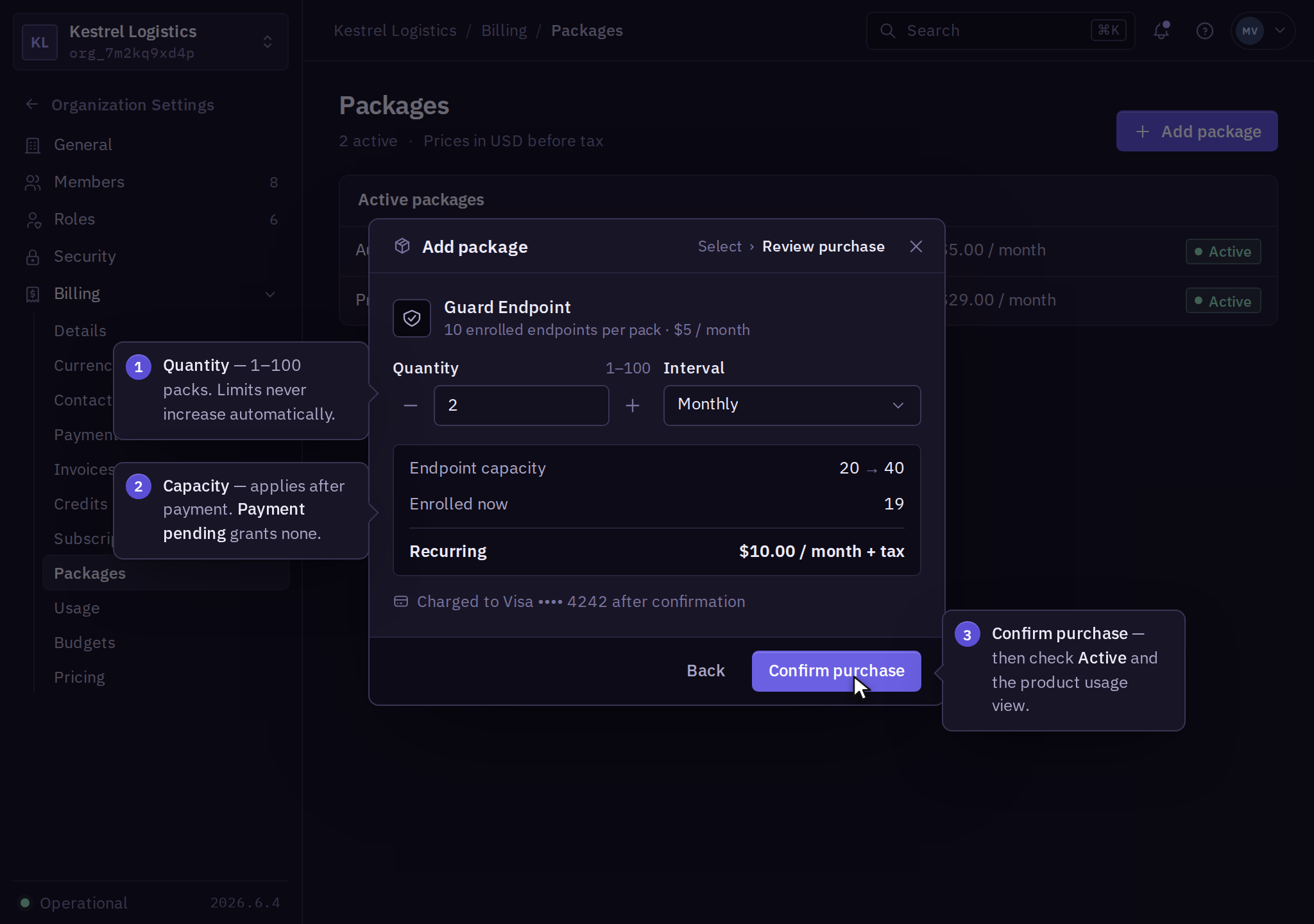
After payment, check for Active and confirm the new limit in the product's usage view. Payment pending grants no additional capacity; follow payment recovery. After an interrupted purchase, inspect the package and invoice before submitting again.
Capacity-pack quantities are 1–100. Audit Archive and Priority Support each allow one instance per organization. Packs require an explicit purchase; exceeding a limit does not buy one automatically.
Change or remove
Open the package and select Change quantity or Cancel renewal. Increases apply after payment; reductions apply at renewal. The review shows any objects or retained data blocking a reduction.
Email and archive-intake reductions keep the month's consumed units. If the reduced allowance is exhausted, further delivery or intake pauses until reset. Each package guide describes its retention and cancellation behavior.