Invoices and receipts
Download billing documents and distinguish an amount due from a settled payment.
Invoices describe charges; receipts confirm collected payments. Retrieve them from Organization Settings → Billing → Invoices in Console using an account with invoice access.
Download a document
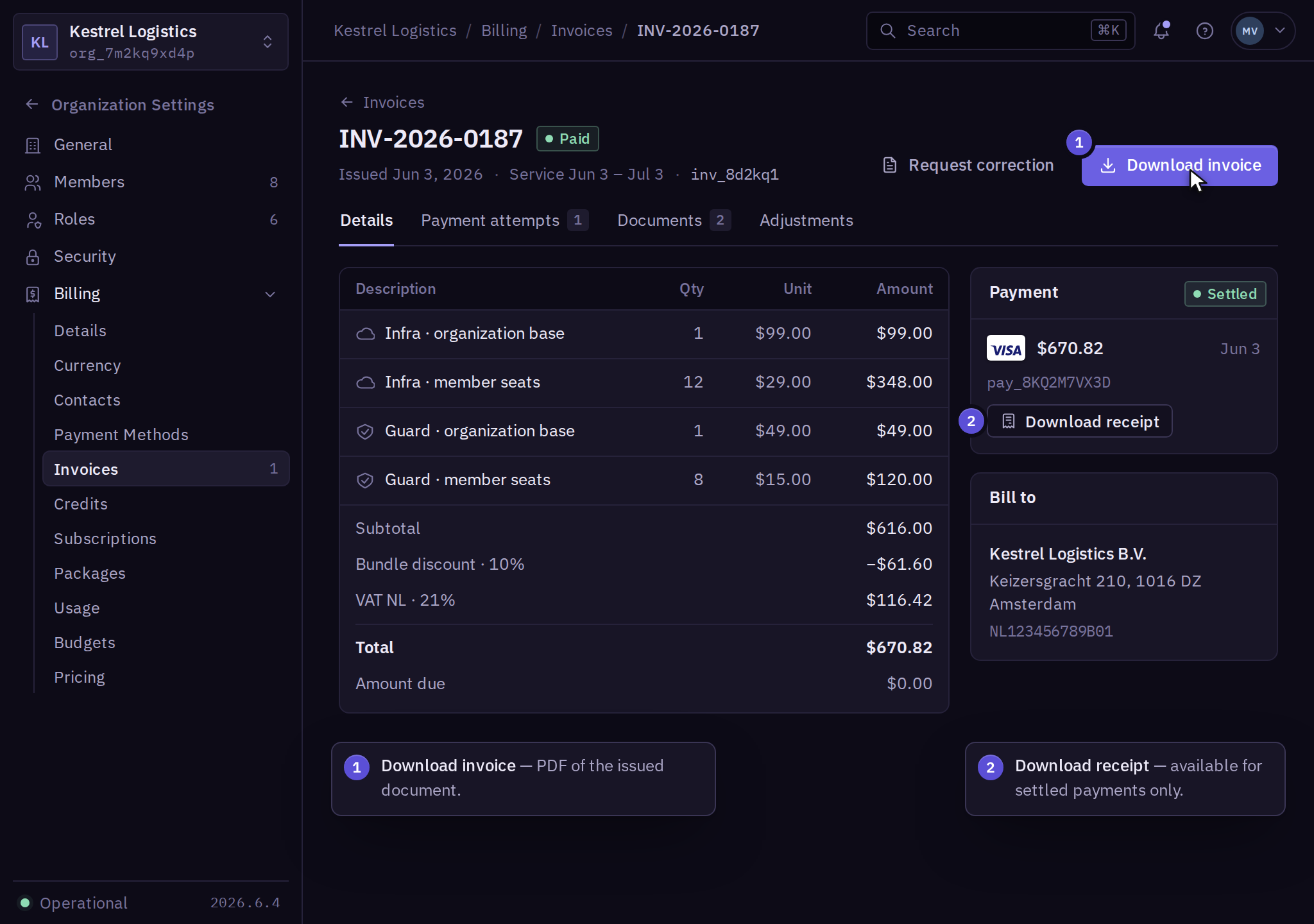
- Select the organization, open Billing → Invoices, and select the invoice by number or issue date.
- Review the service period, currency, line items, tax, amount due, and payment status.
- Select Download invoice and open the PDF to confirm the invoice number and organization.
For a settled payment, open the invoice's payment entry and select Download receipt. Check the payment reference and amount against the invoice. A saved payment method or bank authorization is not a receipt.
Reconcile business records
Match the invoice number and payment reference with your accounting records. For a transfer, retain the bank reference and check whether it has been allocated to the intended invoice. If payment is pending, follow payment recovery before starting a second collection attempt.
Invoice delivery uses the organization's billing contacts. Document access depends on permissions; receiving an email does not assign a finance role.
Request a correction
Update future invoicing details through billing details and tax. For an issued invoice, use Invoice → Request correction and follow invoice corrections. Corrections use a credit note or replacement invoice. Keep the original and related documents together.
Use refunds and disputes for duplicate or disputed charges. Product usage quantities are explained in usage and budgets.